Errors
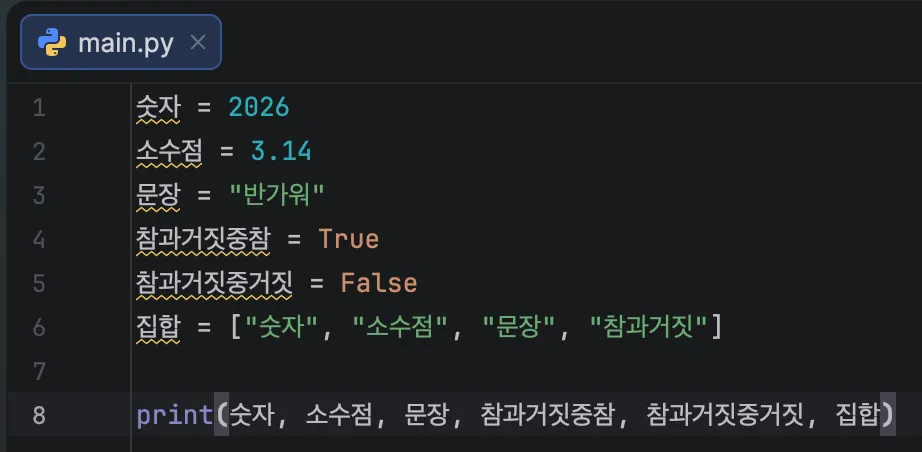
Hmm, something looks different this time.
The variables number, decimal, sentence, true_value, false_value, and list all have yellow underlines.
Let’s move the mouse cursor over a yellow underline.
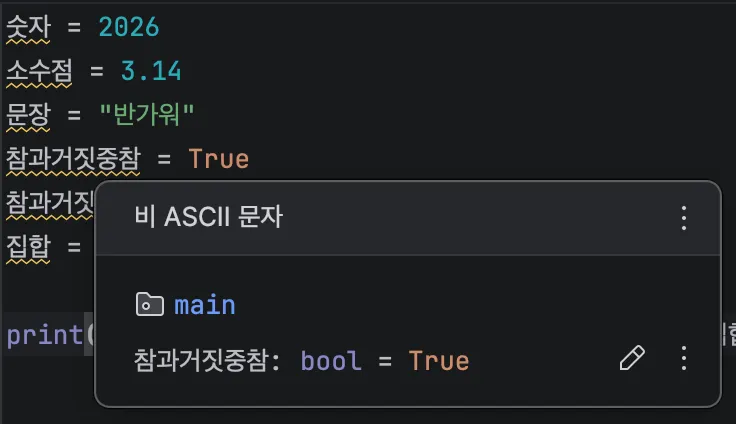
Non-ASCII Characters?
What are ASCII characters? ASCII characters refer to the English alphabet (a, b, c, d…), numbers, and various special symbols. Python strongly recommends not using characters outside of these as variable names.
While you can technically use other languages, Python recommends using only the English alphabet (a, b, c, d…), numbers, and underscores (_).
Other naming rules include:
- Names cannot start with a number.
- Names cannot use certain reserved words like
if,for, etc.
Returning to our main point, when you use an IDE like PyCharm, it underlines parts of your code that have issues.
Each color has a specific meaning:
- Green: Typo
- Not a problem if you don’t fix it.
- For example, writing
pthoninstead ofpython.
- Yellow: Strong recommendation
- It might not be a problem right now, but there’s a high chance it will cause issues later.
- Red: Error
- The command (code) is logically incorrect or has faulty syntax.
In most cases, these error messages also tell you how to fix the problem, making them extremely useful tools for development.